Billing
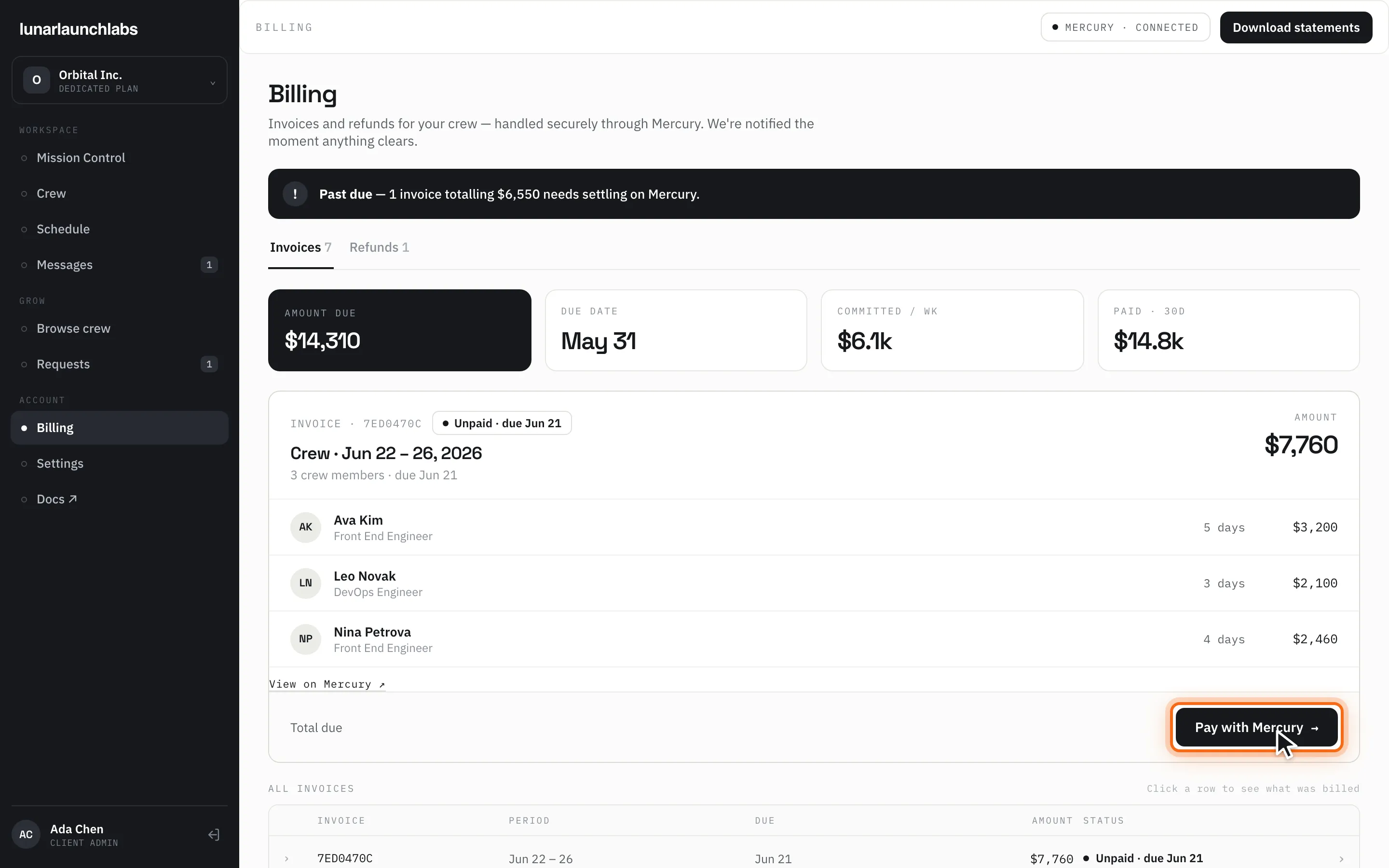
Billing (/billing) shows every invoice and refund for your crew. The title is “Billing”, subtitled “Invoices and refunds for your crew — handled securely through Mercury. We’re notified the moment anything clears.” The header shows the “MERCURY · CONNECTED” badge and a “Download statements” button (CSV export, below).
How the billing cycle works
Section titled “How the billing cycle works”- Weekly, in advance. Each Friday, Lunar Launch Labs invoices the upcoming Monday–Friday of scheduled days, at each crew member’s day rate. The invoice is due the Sunday before the billed week starts.
- Locked days. The moment days are invoiced they become LOCKED on your Schedule — immutable and payable regardless of later changes.
- Changes roll forward. Added days bill on the next invoice — including days you add mid-week for the current week; the Friday run sweeps every not-yet-billed day. Dropping a day before it’s billed simply removes it (days already invoiced are locked, so there is nothing to credit). Refunds issued by L3 arrive as negative adjustment lines on the next invoice.
- Pause retainer. While a placement is paused, its scheduled days bill at the pause-retainer percentage stated on your Placement Order (they appear as “{title} · {pct}% retainer” lines).
- Payment is ACH via Mercury. Use the “Pay with Mercury →” button on the invoice card (or “View on Mercury ↗”) — payment happens on Mercury’s hosted page; no credit cards. Statuses update automatically once Mercury confirms, as the footer notes: “Invoices and refunds are issued by Lunar Launch Labs and settled through Mercury. Statuses update automatically once Mercury confirms.”
- Fully-credited weeks (where credits cover the whole invoice) settle automatically as paid — nothing to do.
The invoices tab
Section titled “The invoices tab”Summary tiles: AMOUNT DUE (everything currently owing), DUE DATE (the earliest owing date), COMMITTED / WK (the current period’s total), and PAID · 30D.
The current invoice card shows the invoice reference (e.g. INVOICE · 9F3A21B4), the period (“Crew · Jun 8 – 21, 2026”), crew-member count and due date, each line (member, role, days, amount — retainer lines annotated), any signed adjustments (+$120 / −$840), the total (“Total due”, or “Total paid” once paid), and the Mercury pay link.
ALL INVOICES (“Click a row to see what was billed”) lists every invoice: reference, period, due date, amount, and status. Expanding a row shows “BILLED THIS PERIOD” with the full line breakdown. The header search filters by reference, period, or status.
Before your first booking the tab shows “No invoices yet” — “Your first weekly invoice appears here once your crew is booked.”
Invoice statuses
Section titled “Invoice statuses”| Status | Meaning |
|---|---|
| Draft | Being prepared — not yet issued |
| Unpaid · due {date} | Issued and awaiting payment |
| Processing | Payment initiated — Mercury is clearing it |
| ✓ Paid · {date} | Settled |
| Past due · was due {date} | The due date passed without payment (the All-Invoices table shortens this to “Past due · {date}”) |
| Cancelled | Voided by Lunar Launch Labs |
Past due, dunning, and the request pause
Section titled “Past due, dunning, and the request pause”When an invoice goes past due:
- A “Past due” alert banner appears here (“{n} invoice(s) totalling {$X} need settling on Mercury.”) and on Mission Control’s billing card.
- Your billing contact receives the email “Your invoice is past due” with a Pay invoice link — sent once per invoice.
- If any invoice stays unpaid past the platform’s grace threshold (a number of days set by Lunar Launch Labs), new crew requests are paused until the balance is settled. Existing placements and schedules keep running — the pause affects new asks only.
Disputes: per your MCSA, dispute an invoice line in writing through the platform (message the crew desk) within 5 business days of issue; valid disputes resolve as credit memos on the next invoice.
The refunds tab
Section titled “The refunds tab”The Refunds tab lists credits L3 has issued: description, “Issued {date}”, and amount. Refunds are applied as credits to your next invoice (never as reversals of a paid one). Empty state: “No refunds yet” — “Credits from dropped days and adjustments appear here once issued.”
Downloading statements (CSV)
Section titled “Downloading statements (CSV)”“Download statements” saves lunarlaunchlabs-billing.csv:
- Columns:
ref, period, status, dueDate, total, paidAt. - One row per invoice (newest period first), amounts in plain dollars (e.g.
38800.00). - Refund rows follow with status
REFUND, a negative total, and the issue date in thepaidAtcolumn.
Exporting your own billing data is expressly permitted use of platform data.