Mission Control
Mission Control (/mission-control) is your home dashboard. The greeting reads “Welcome back, {your first name}” with the subtitle “Here’s your crew at a glance.” and a week stamp on the right (e.g. “WEEK OF JUN 22, 2026”).
The header has a search box (“Search crew, schedule…”) and the “+ Book a crew” button, which opens the new-request sheet on the Requests page.
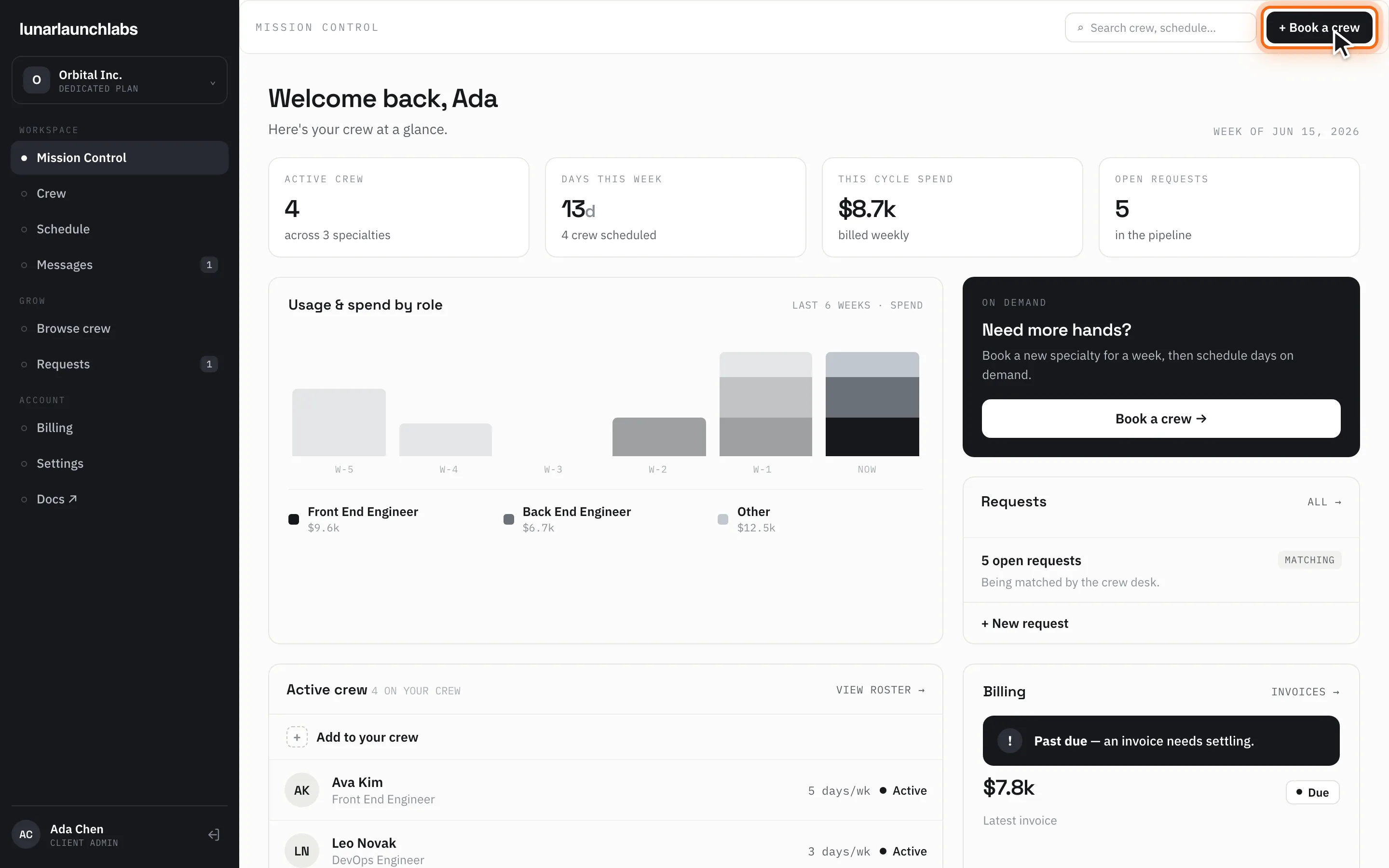
The four stat tiles
Section titled “The four stat tiles”| Tile | Value | Sub-line |
|---|---|---|
| ACTIVE CREW | Crew members on live placements | “across N specialties”, or “nobody placed yet” |
| DAYS THIS WEEK | Scheduled crew-days this week, with a d suffix |
“{n} crew scheduled” |
| THIS CYCLE SPEND | This week’s total at your day rates, compact (e.g. $13.4k) |
“billed weekly” |
| OPEN REQUESTS | Requests still in the pipeline | “in the pipeline”, or “all clear” |
Usage & spend by role (chart)
Section titled “Usage & spend by role (chart)”The “Usage & spend by role” card (meta: LAST 6 WEEKS · SPEND) is a stacked bar chart of your weekly spend:
- Columns run oldest → newest, labeled
W-5…W-1andNOW. - Your top two specialties by spend get their own tone; the rest collapse into “Other” when more than three appear.
- Hovering a bar shows the week, a per-role breakdown (e.g. “Front End $4.2k · Design $2.1k”) and the week’s total — or “No booked days”.
The right-hand cards
Section titled “The right-hand cards”- ON DEMAND — an upsell card: “Need more hands?” — “Book a new specialty for a week, then schedule days on demand.” with a “Book a crew →” button.
- Requests (with ALL →) — “{n} open request(s)”, a MATCHING badge whenever any request is unresolved, and the line “Being matched by the crew desk.” (or “Nothing waiting on a match.”). The “+ New request” link jumps to Requests.
- Billing (with INVOICES →) — your latest invoice’s amount and status pill (
Draft,Due,Processing,✓ Paid,Past due,Cancelled), captioned “Latest invoice” (or “No invoices yet”). If anything is overdue, a “Past due” alert banner appears here — settle it from Billing.
Active crew roster
Section titled “Active crew roster”The “Active crew” card (count chip “{n} ON YOUR CREW”, plus VIEW ROSTER →) lists your live crew. The first row is always “+ Add to your crew”, linking to Browse crew. Each member row shows their avatar, name, role, cadence (“1 day/wk” / “{n} days/wk”), and a status pill for active/scheduled members (paused members render muted with “—”).
Empty state: “No crew yet — book your first specialist.”
Loading and errors
Section titled “Loading and errors”While loading, a spinner. On failure: “Could not load your dashboard. Please try again.” with a Retry button.